A paused prospect, Ubic puts it back in the list.
When a prospect is paused, Ubic sets it aside and puts it back in the calling list after a delay you define.
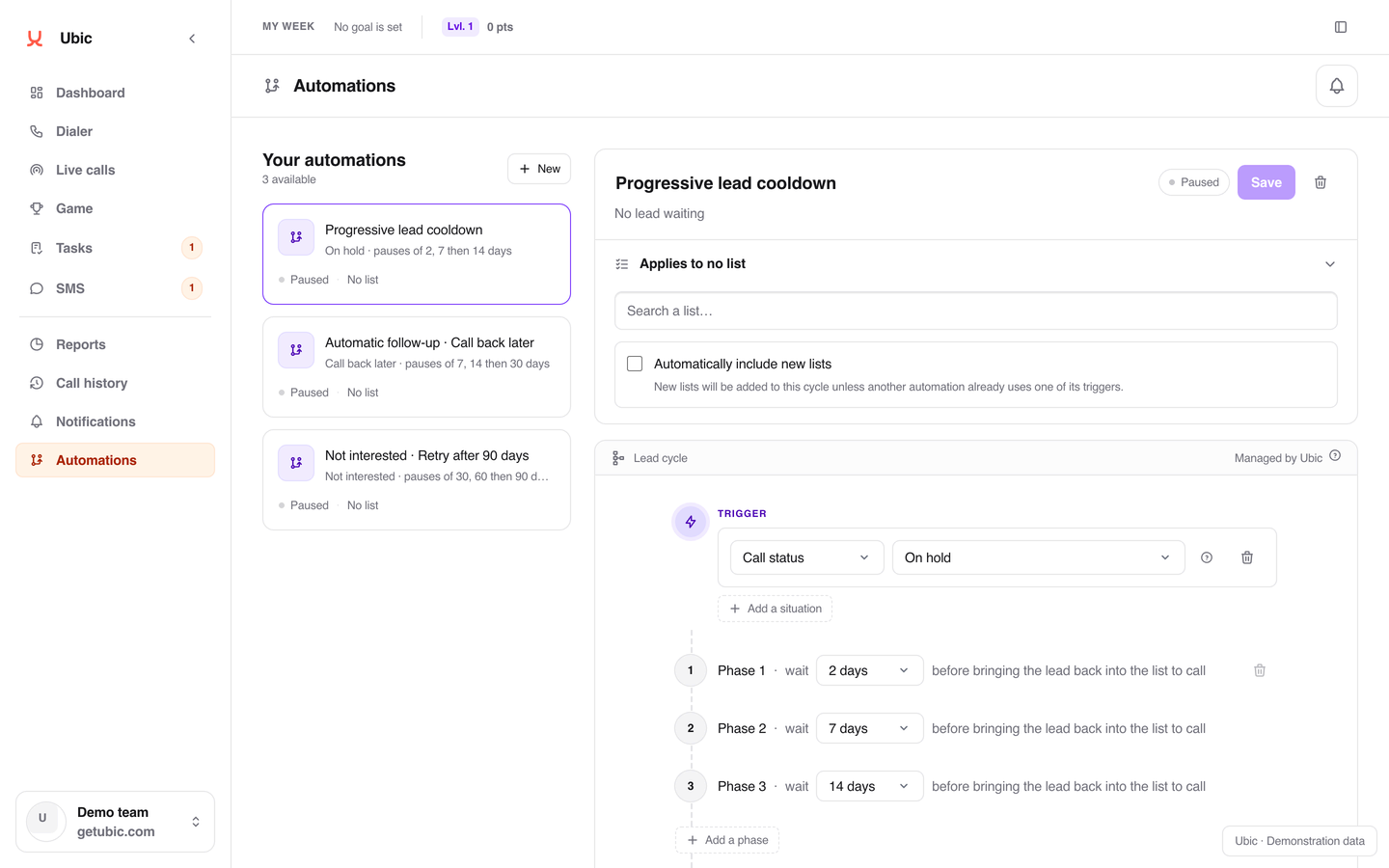
What happens when a prospect doesn’t pick up.
The prospect is paused
They didn’t pick up, the cycle starts.
Before going back in the list
Two days apart, then the prospect becomes callable again.
Still unreachable
The prospect enters the next phase.
More distance
Seven days before the next call attempt. Then fourteen.
Loop or exit
Repeat the final delay or exit the cycle. Exit actions depend on compatible properties.
Three steps, and the cycle runs.
Pick the list
You enable progressive pausing on a list. Two automations cannot cover the same trigger on the same list.
Set the phases
Each phase waits for a delay in days or a prospect date. On a new pause, Ubic can move to the next phase.
Define the end
At the end of the cycle, repeat the final delay or remove the prospect from the workflow. On exit, you can update compatible properties or clear their values.
How progressive pausing works.
One cadence per list
Hot list, cold list, key accounts: each list has its own delays. You set the rhythm per list.
Delays that stretch
Start with a short delay, then space out later attempts. The default cycle uses 2, 7 and 14 days; these delays can be changed.
The cycle visible everywhere
On the record, an indicator and the Activity tab show the current phase and the return date. The Dialer shows how many prospects are cycling.
Exit actions
On exit, update or clear the offered properties. This cleanup is available for local lists and compatible mapped Airtable fields; it does not complete a follow-up task.
After qualification, follow-up continues in your tools.
An administrator selects Add a step in Automations, configures the action and saves the workflow. Available actions depend on the connected integrations.
Delays can count only Monday to Friday. A phase can also wait for an available prospect date field; a missing date keeps the prospect waiting. Follow-up processing still runs overnight.
Stop a Humanlinker sequence
Request a stop in the source campaign after a selected qualification. The prospect’s other campaigns are unchanged; a message already sent is not canceled.
View the connectionCreate a HubSpot Email task
Assign a task to the selected HubSpot owner on an existing contact from the same account. This prepares follow-up without sending the email.
View the connectionSend a Slack message
Notify the team in the authorized channel using the available variables. Legacy notifications need migration before an equivalent action is added.
View the connectionActions follow a new human qualification after a call or on the record. They do not replay past prospects and are not triggered by a CRM import. A requested action still awaits confirmation.
Understand automationsFrequently asked questions.
All answersHow many numbers does Ubic call in parallel?
Ubic calls up to 3 numbers in parallel. Voicemails, fax lines and invalid numbers are filtered out automatically. As soon as someone picks up, you are connected with no silence.
Which CRMs work with Ubic?
Ubic offers 25 native integrations: Salesforce, HubSpot, Pipedrive, Zoho CRM, Apollo, monday CRM, Attio, Freshsales, Close, noCRM, Odoo CRM, NetHunt, BoondManager, folk, Airtable, Sellsy, User.com, Lemlist, Humanlinker, Salesloft, ActiveCampaign, Gong, Modjo, Creatio, Slack. Imports and updates depend on the connector and its settings. The Ubic API can also connect a business tool, and the MCP connector gives AI assistants read access to authorized data. CSV import is available too.
How does billing work?
Founder is €99 excluding VAT per user per month, billed monthly: 500 calling minutes to standard landlines and mobiles in France, with unlimited call attempts within the included minutes, 400 transcribed minutes with AI summaries after calls and 200 SMS to French mobiles. Booster is €200 monthly, €180 per month billed quarterly or €160 per month billed annually, excluding VAT. Quarterly and annual terms are paid upfront. Custom pricing is also available.
Does Ubic provide the phone numbers?
Yes. Ubic provides the numbers and monitors their deliverability. Automatic rotation of outbound numbers limits the risk of a number being flagged as spam. You never manage the phone infrastructure.
How long does it take to set up Ubic?
Setup is fast. You import your lists (CSV or CRM sync), connect your integrations and run your first call sessions. Onboarding is done with every new team. First results show within the week.
Let Ubic handle paused prospects.
15 minutes to set up a first cycle on a list.
Core app infrastructure on AWS Paris · Onboarding and support in French