
Your CRM connected in minutes.
Import lists and contacts, map the data your team needs, then send back supported fields, statuses, or activities. 24 native integrations in total.
Three steps, and your list is ready to call.
Choose your CRM
In Create a list, pick your CRM from the sources, or a CSV file.
Authorize the connection
Depending on the CRM, you authorize Ubic or enter the access key provided by the tool. You can revoke the connection from the CRM.
List imported
Columns are mapped, numbers without a country code get yours, and the list is ready to call.
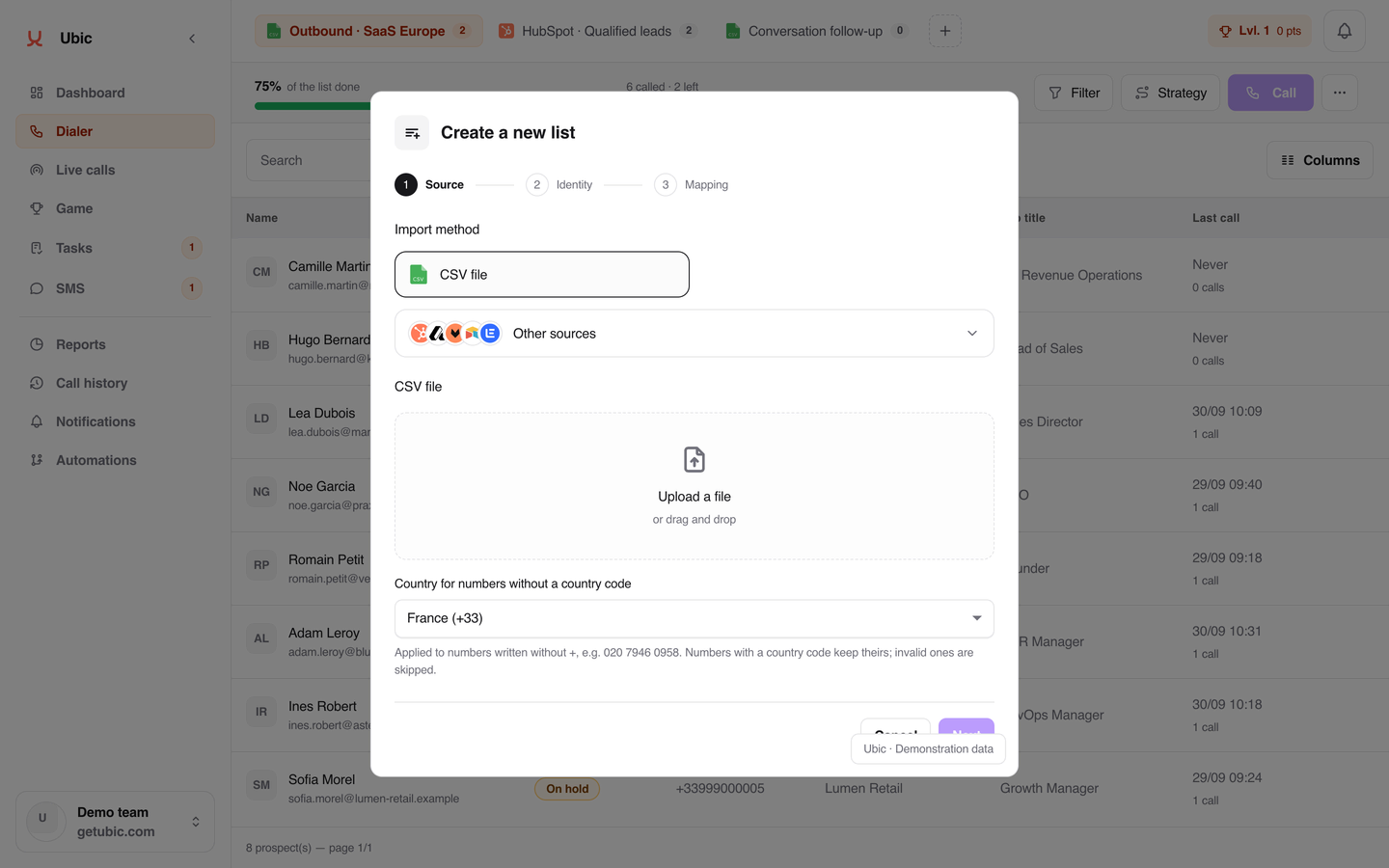
Your lists come into Ubic, your results go back to the CRM.
It depends on the connector. Each integration’s page has the details.
Into Ubic
Your lists and contacts, with the fields you need to qualify: job title, company, LinkedIn, and your custom fields.
Back to your CRM
Prospect status, call status and duration, notes, activity and, depending on the connector, the recording and transcript.
No double entry
What you fill in on the prospect record during the call is sent back once the call ends. Nothing to type twice.
And without a CRM
CSV import works too, with automatic column mapping. Results can be exported from reports.
Your native integrations.
 Salesforce
 HubSpot
 Pipedrive
 Zoho CRM
 Apollo
 monday CRM
 Attio
Attio Freshsales
 Close
Close noCRM
noCRM Odoo CRM
 NetHunt
 BoondManager
 folk
folk Airtable
 Sellsy
 User.com
 Lemlist
 Salesloft
 ActiveCampaign
 Gong
Gong Modjo
Modjo Creatio
 Slack
Slack
Each logo opens the integration’s page: what is imported, what is sent back, and how to connect it.
Frequently asked questions.
All answersHow many numbers does Ubic call in parallel?
Ubic calls up to 3 numbers in parallel. Voicemails, fax lines and invalid numbers are filtered out automatically. As soon as someone picks up, you are connected with no silence.
Which CRMs work with Ubic?
Ubic ships 24 native integrations: Salesforce, HubSpot, Zoho CRM, Pipedrive, noCRM, Attio, NetHunt, Close, User.com, BoondManager, monday CRM, Freshsales, Odoo CRM, folk, Sellsy, ActiveCampaign, Creatio, Salesloft, Lemlist, Apollo, Gong, Modjo, Slack and Airtable. Depending on the connector, Ubic imports lists and sends back supported fields, statuses, or activities. CSV import works too, with automatic column mapping.
How does billing work?
Founder is €99 excluding VAT per user per month, billed monthly: 500 calling minutes to standard landlines and mobiles in France, with unlimited call attempts within the included minutes, 400 transcribed minutes with AI summaries after calls and 200 SMS to French mobiles. Booster is €200 monthly, €180 per month billed quarterly or €160 per month billed annually, excluding VAT. Quarterly and annual terms are paid upfront. Custom pricing is also available.
Does Ubic provide the phone numbers?
Yes. Ubic provides the numbers and monitors their deliverability. Automatic rotation of outbound numbers limits the risk of a number being flagged as spam. You never manage the phone infrastructure.
How long does it take to set up Ubic?
Setup is fast. You import your lists (CSV or CRM sync), connect your integrations and run your first call sessions. Onboarding is done with every new team. First results show within the week.
See the difference in one week.
Connect your CRM, run your first sessions, compare with the week before.
Core app infrastructure on AWS Paris · Onboarding and support in French